
Issue 113: Know Thy Time, pt. 3
👋 Good Morfternight, this is Paolo with the 113th edition of Morfternight, your Digital Postcard on Tools and Thoughts for Leaders.
This is the third chapter of the “Know Thy Time” series, where I share my approach to time management.

In Morfternight 108, we covered the principles behind my time management practice and in Morfternight 111, I explained the method I use.
Today opens a new chapter: Tools.
Remember, I’m still on the hunt for the ultimate tool, but I’ve got some top picks. They all have their quirks and perks, so read carefully and choose wisely. One person’s trash is another person’s treasure!
Our spotlight stealer for the day is Akiflow.
By the way, although this post is not sponsored, anyone who uses this referral link and starts a trial of Akiflow will receive a $25 credit, which I will also receive.
Time Blocking with Akiflow
As covered multiple times in the Know Thy Time series, time blocking is a game-changer for productivity, but it can be a hassle to manage your calendar and tasks separately. What if you could have everything in one place?
All the information you need…
To practice time blocking effectively, you need two key pieces of information:
- Details about your events (usually in your calendar).
- Details about your tasks (typically in a task manager or project management tool).
…in one place.
Akiflow integrates with various tools, seamlessly merging all your tasks and events into one central location.
Connect it with Gmail and Outlook to turn emails into tasks, and integrate with Slack, GitHub, Notion, Microsoft To Do, Teams, Todoist, Asana, ClickUp, Linear, Jira, Trello, Zapier, and IFTTT.
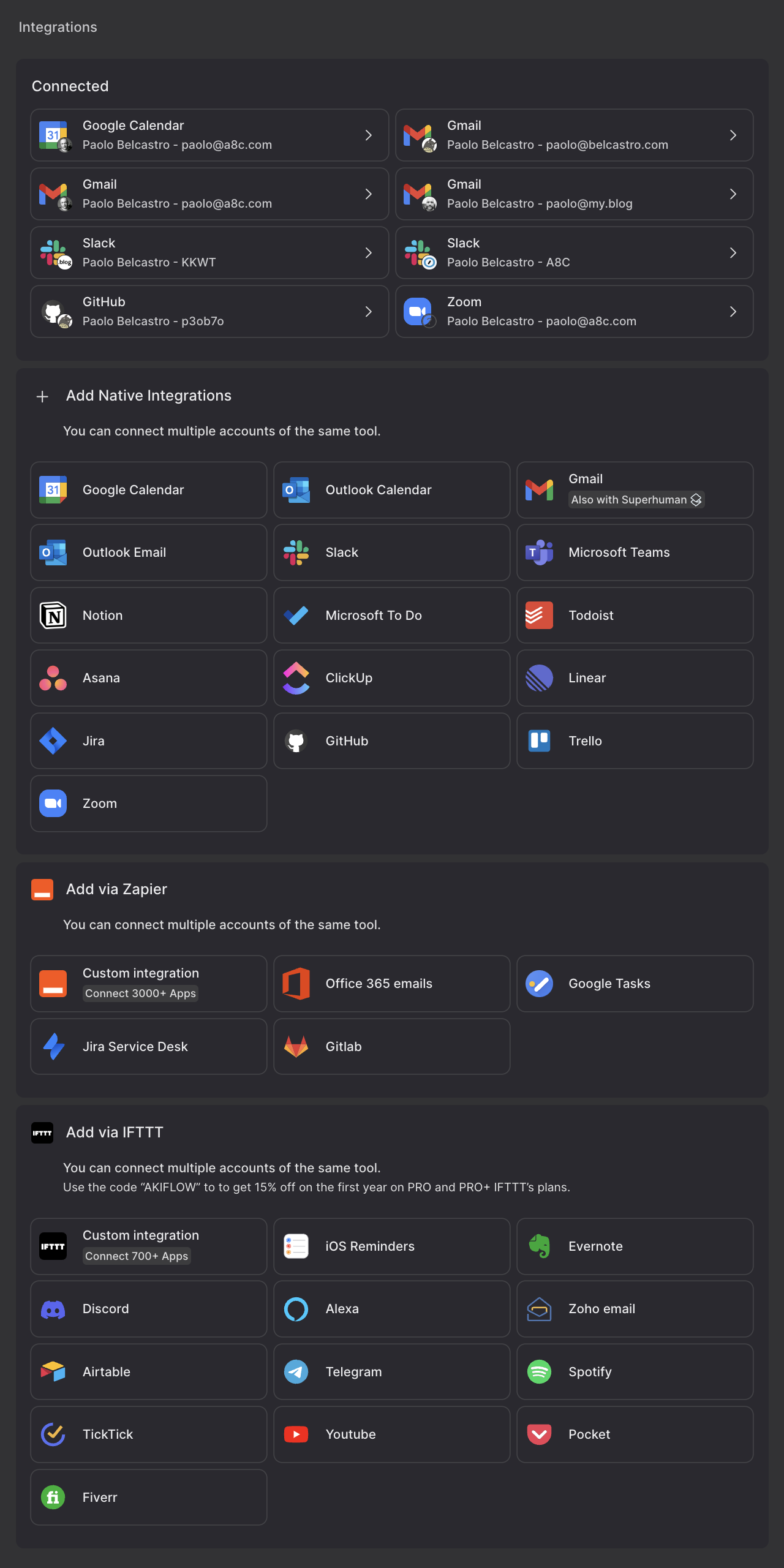
Create tasks from almost any platform with just one click.
What Makes Akiflow Stand Out ↗↗↗
At first glance, Akiflow might seem like just another calendar app. You can create events, invite people, manage recurring events and connect it to popular calendar services.
But Akiflow goes beyond that. An example?
🗣️ It offers a command bar for quick event creation using natural language. You can type “Lunch with Jim tomorrow at 1pm” and it will create the event for you.
And much more.
Scheduling
Once your tasks are in Akiflow, scheduling them is a breeze. You can drag and drop tasks from your inbox to your calendar, define the size of the task, and set deadlines. If you have time slots reserved for tasks but don’t know what you’ll do yet, you can block those times in advance.
It allows you to create three types of slots: events, reserved slots for future tasks, and the tasks themselves.
Organizing Tasks Beyond the Calendar
Akiflow offers multiple views to help you stay organized.
- The inbox is where all your tasks land before being scheduled.
- The upcoming view shows tasks scheduled for the future.
- The today view focuses on tasks for the current day.
You can also create projects and tags to categorize tasks. Projects allow you to group related tasks and color-code them for easy identification on your calendar.
Daily and Weekly Routines
Akiflow supports daily and weekly planning sessions. You can set reminders for daily planning or shutdown sessions.
Personally, I prefer weekly planning and have a recurring task every Sunday for a weekly wrap-up and planning session. This helps me review unfinished tasks and schedule the upcoming week.
Customization and Collaboration
Akiflow offers various customization options, such as setting your primary and secondary time zones, defining your work hours, and choosing your preferred date format.
There is an active Slack community where users can interact with the development team, providing direct access to support and feedback.
It also integrates with conference tools like Zoom and Google Meet, making it easy to set up meetings. You can even share your availability with others, similar to tools like Calendly, but without the extra cost.
The Downsides ↘↘↘
While Akiflow is a powerful tool, it has its flaws.
Being a relatively young app, there are some bugs and rough edges. For instance, the shortcuts can be confusing if you use a non-QWERTY keyboard layout. The design could also be more streamlined, and currently, there’s no built-in note-taking feature, which I find essential for my workflow.
Some of these issues are addressed and resolved in the tools we’ll discuss next (Notion and Tana), but none of them is perfect. That’s why I’m sharing insights on all three!
Despite these minor drawbacks, Akiflow has become an essential part of my daily routine. It offers the most integrated, all-in-one solution for time blocking that I’ve come across so far.
If you’re looking to enhance your productivity, I highly recommend giving Akiflow a try. Remember, I’m not sponsored by them; I just genuinely appreciate the tool and the effort behind it.
If you have any questions or would like to share your experiences, please feel free to leave a comment below. Let’s make time blocking work for you!
Next up →→→
Akiflow is what I landed on, but to close off the “Know Thy Time” series I will also share possible workflow in two other tools: Notion and Tana. Stay tuned for those.
Meanwhile, in Vienna…
I took this photo in Vienna in 2021, and it seemed fitting: just as everyone has their preferred mean of transportation — whether it’s a bike, car, or train — when it comes to time management, it’s all about finding the right tool that fits your style. To each their own!

→→→ Add me on LinkedIn
Until we meet again…
Thank you for being a subscriber.
If someone forwarded this to you, subscribe to get your copy in the future.
Cheers,

P.S.: If you enjoyed reading this, please don’t hesitate, and share it!
Leave a reply