Ever had Claude wait twenty minutes for your “yes,” while you made coffee in the next room?
This is the small annoyance of agentic work: most tool calls go through, but every now and then Claude wants to do something that needs a human confirmation. Delete a folder. Push a branch. Run a script it hasn’t run before. The agent stops and waits.
If I’m at the laptop, fine — I tap and it continues. If I’m not, the agent just sits there. I’ve come back twenty minutes later thinking the work was running, only to find a permission dialog patiently blocking everything.
The point of an agent is that it does things while you’re elsewhere. So this kept bugging me.
What I built
I bought an M5Stack M5StickS3 — a tiny ESP32-S3 dev board with a 240×135 screen, a six-axis IMU, two buttons, and a speaker. It fits in the palm of my hand.
Anthropic ships a reference firmware for an older model (the M5StickC Plus) that pairs with Claude Desktop’s Hardware Buddy panel over Bluetooth LE. I asked Claude to write my own firmware from scratch, against their protocol spec, for the newer S3.
The repo is at p3ob7o/hwbuddy-notifier-S3.
What it feels like
When Claude Desktop hits a permission prompt — delete this folder? — three things happen on the M5 within a second or two:
- The screen lights up with an animated character and the tool name.
- A short chime plays. (Silent if the device is face-up, since I’m already looking at it.)
- A pill selector appears: Approve / Deny.
I tap the side button to switch between options, and the front button to confirm. If I’m holding it loose and want to deny quickly, I just shake it — a vigorous shake while a prompt is active equals Deny.
Bluetooth range, so I need to be within reach of the laptop. That’s fine for how I work; I’m rarely more than a room away from the machine.
What’s under the hood
Three things make this work:
- Anthropic’s BLE protocol: Nordic UART Service, newline-delimited JSON. The desktop sends heartbeat snapshots and permission prompts; the device replies with
permissiondecisions (onceordeny) andstatusacks. - LE Secure Connections with bonding. A six-digit passkey shows on the M5 during pairing; macOS asks me to type it on the desktop side. Transcript snippets that flow over the link are AES-CCM encrypted.
- A character GIF and a melody, both swappable. The repo ships with neither, by design, because I used Totoro as a character and chime, but I don’t own the rights to it so I can’t distribute it. Bring your own.
tools/encode_gif.pyresizes and encodes a GIF to the device’s color format;src/melody.his a flat list of (frequency, duration) tuples. I picked the sheet music from the song, asked ChatGPT to translate it into frequencies and durations, made a few edits.
So this:
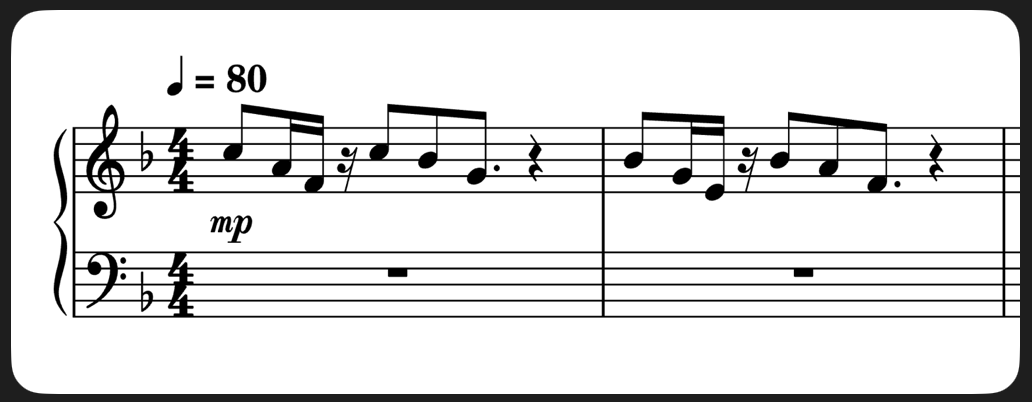
Became this:
1. C5 523.25 Hz 0.375 s
2. A4 440.00 Hz 0.1875 s
3. F4 349.23 Hz 0.1875 s
4. Rest 0.1875 s
5. C5 523.25 Hz 0.375 s
6. Bb4 466.16 Hz 0.375 s
7. G4 392.00 Hz 0.5625 s
8. Rest 0.75 s
9. Bb4 466.16 Hz 0.375 s
10. G4 392.00 Hz 0.1875 s
11. E4 329.63 Hz 0.1875 s
12. Rest 0.1875 s
13. Bb4 466.16 Hz 0.375 s
14. A4 440.00 Hz 0.375 s
15. F4 349.23 Hz 0.5625 s
16. Rest 0.75 s
Why this matters to me
I like auto mode, where Claude only asks for permission when it matters, anywhere beyond hobby projects I don’t feel comfortable unleashing bypass permissions mode.
So this little hardware buddy, Totoro in my case, makes it easy and fun to give the occasional permissions, or deny once in a while when Claude is too reckless.
It also turns out to be fun to have a physical object that means “the agent wants something from you.” A chime in your pocket is more present than a notification badge on a laptop you’ve stepped away from.
And it was a nice weekend project.
Leave a reply